Render Markdown in the Terminal with Node.js
To render Markdown in the terminal from Node.js, pass the Markdown string to toAnsi() from md-to-rich and write the result to process.stdout. You get headings, emphasis, lists, blockquotes, box-drawn tables and code blocks as ANSI escape sequences, word-wrapped to the width you choose.
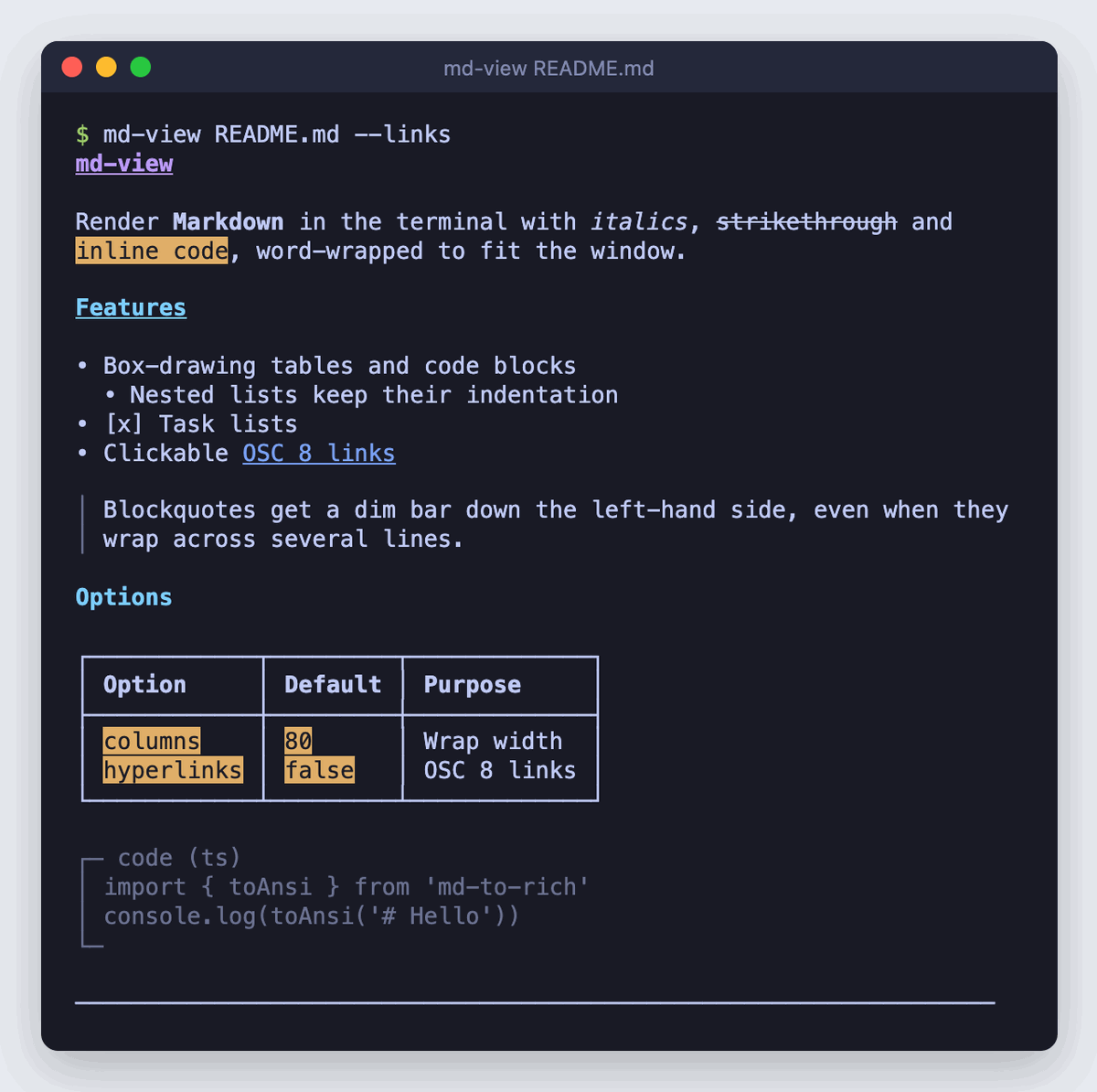
A minimal script
npm install md-to-rich
Save this as render.ts in an ES module project ("type": "module", needed for top-level await) and run it with npx tsx render.ts:
import { readFile } from 'node:fs/promises'
import { toAnsi } from 'md-to-rich'

const md = await readFile('README.md', 'utf8')
process.stdout.write(toAnsi(md) + '\n')
toAnsi() is synchronous and returns a string. It doesn't add a trailing newline, so add one yourself.
Fit the terminal width
Paragraphs, list items and horizontal rules wrap to the columns option. If you leave it out, toAnsi() uses process.stdout.columns ?? 80. Set it yourself if you want a cap for readability, or a guard against unusual terminals:
import { readFile } from 'node:fs/promises'
import { toAnsi } from 'md-to-rich'

const md = await readFile('README.md', 'utf8')

// undefined when piped or redirected, and 0 in some pseudo-terminals
const columns = Math.min(process.stdout.columns || 80, 100)

process.stdout.write(toAnsi(md, { columns }) + '\n')
Use || rather than ??. Some pseudo-terminals, such as one opened by script without a parent terminal, report columns as 0. The built-in ?? default keeps that 0, and you get one word per line.
Wrapping counts characters, not terminal cells. CJK characters take two cells each, so lines of CJK text can run past the width. Tables are never wrapped and are as wide as their widest cells.
Respect NO_COLOR and piped output
toAnsi() always emits escape codes. It has no plain-text mode and doesn't read NO_COLOR or check for a TTY. Decide in your own code, and strip the codes with Node's built-in stripVTControlCharacters when colour should be off:
import { readFile } from 'node:fs/promises'
import { stripVTControlCharacters } from 'node:util'
import { toAnsi } from 'md-to-rich'

const md = await readFile('README.md', 'utf8')

const useColour = process.stdout.isTTY === true && !process.env.NO_COLOR
const columns = Math.min(process.stdout.columns || 80, 100)

const ansi = toAnsi(md, { columns, hyperlinks: useColour })
const output = useColour ? ansi : stripVTControlCharacters(ansi)

process.stdout.write(output + '\n')
The stripped output keeps its structure: the • bullets, the │ blockquote bar and the box-drawn tables and code blocks are plain Unicode characters, not escape codes. Turn hyperlinks off whenever you strip. With hyperlinks off, links render as label (url), so the URL survives in a log file or a pipe.
Clickable OSC 8 hyperlinks
Set hyperlinks: true to wrap each link in an OSC 8 sequence. Supporting terminals show only the label, and you can click it:
import { toAnsi } from 'md-to-rich'

const md = 'Read the [API reference](https://md-to-rich.jithins.dev/docs/api/to-ansi).'

console.log(toAnsi(md, { hyperlinks: true }))  // clickable label only
console.log(toAnsi(md))                         // label followed by (url)
OSC 8 works in iTerm2, Kitty, WezTerm, Windows Terminal, GNOME Terminal and other VTE-based terminals, and in the VS Code integrated terminal. A terminal without support usually ignores the sequence and prints only the label, so the URL disappears. That's why it's off by default. Turn it on only for terminals you know support it, or behind a flag, as the CLI below does.
Before it builds the sequence, toAnsi() removes control characters from the URL. A crafted link in untrusted Markdown can't end the sequence early and inject its own escape codes.
Page long output through less
Piping into a pager from the shell, as in node render.js | less -R, makes stdout a pipe. isTTY is then false, so the check above turns colour off. Instead, spawn the pager from inside your script, and only when the output is taller than the window:
import { spawn } from 'node:child_process'
import { readFile } from 'node:fs/promises'
import { toAnsi } from 'md-to-rich'

function page(text: string): void {
  const rows = process.stdout.rows ?? Infinity
  if (!process.stdout.isTTY || text.split('\n').length < rows) {
    process.stdout.write(text + '\n')
    return
  }

  const less = spawn('less', ['-R'], { stdio: ['pipe', 'inherit', 'inherit'] })
  less.on('error', () => process.stdout.write(text + '\n')) // less not installed
  less.stdin.on('error', () => {}) // user quit before reading everything
  less.stdin.end(text + '\n')
}

const md = await readFile('README.md', 'utf8')
page(toAnsi(md))
-R tells less to pass colour sequences through rather than showing them as ESC[1m. Recent releases of less also pass OSC 8 links through. With an older less, leave hyperlinks off when paging. The error handler covers systems without less, such as a stock Windows install, by printing directly.
A complete CLI: md-view README.md
This puts the pieces together in an installable command. The project layout:
md-view/
├── package.json
├── tsconfig.json
└── src/
    └── md-view.ts
package.json maps the md-view command to the compiled file with bin:
{
  "name": "md-view",
  "version": "1.0.0",
  "type": "module",
  "bin": {
    "md-view": "./dist/md-view.js"
  },
  "files": ["dist"],
  "scripts": {
    "build": "tsc"
  },
  "dependencies": {
    "md-to-rich": "^2.0.1"
  },
  "devDependencies": {
    "@types/node": "^22.0.0",
    "typescript": "^5.6.0"
  }
}
tsconfig.json:
{
  "compilerOptions": {
    "target": "ES2022",
    "module": "NodeNext",
    "moduleResolution": "NodeNext",
    "strict": true,
    "rootDir": "src",
    "outDir": "dist"
  },
  "include": ["src"]
}
src/md-view.ts:
#!/usr/bin/env node
import { spawn } from 'node:child_process'
import { readFile } from 'node:fs/promises'
import { parseArgs, stripVTControlCharacters } from 'node:util'
import { toAnsi } from 'md-to-rich'

const { values, positionals } = parseArgs({
  allowPositionals: true,
  options: {
    links: { type: 'boolean', default: false },
    'no-pager': { type: 'boolean', default: false },
  },
})

const file = positionals[0]
if (!file) {
  console.error('Usage: md-view <file.md> [--links] [--no-pager]')
  process.exit(1)
}

const md = await readFile(file, 'utf8').catch(() => {
  console.error(`md-view: cannot read ${file}`)
  process.exit(1)
})

const isTTY = process.stdout.isTTY === true
const useColour = isTTY && !process.env.NO_COLOR
const columns = Math.min(process.stdout.columns || 80, 100)

const ansi = toAnsi(md, { columns, hyperlinks: useColour && values.links })
const output = useColour ? ansi : stripVTControlCharacters(ansi)

const rows = process.stdout.rows || Infinity
if (!isTTY || values['no-pager'] || output.split('\n').length < rows) {
  process.stdout.write(output + '\n')
} else {
  const less = spawn('less', ['-R'], { stdio: ['pipe', 'inherit', 'inherit'] })
  less.on('error', () => process.stdout.write(output + '\n'))
  less.stdin.on('error', () => {})
  less.stdin.end(output + '\n')
}
Build it and link it to try it out:
npm install
npm run build
npm link

md-view README.md                 # colour, paged if longer than the window
md-view README.md --links         # clickable OSC 8 links
md-view README.md | grep install  # plain text, no escape codes
NO_COLOR=1 md-view README.md      # plain text in a terminal
tsc keeps the #!/usr/bin/env node line, and npm makes the bin file executable when it installs or links the package.
FAQ
Does md-to-rich need chalk to render Markdown in the terminal?
No. The ANSI serializer writes the escape codes itself and has no colour library dependency. Alongside a built-in default theme, it renders OSC 8 hyperlinks and box-drawn tables without extra packages. Markdown parsing comes from remark, which md-to-rich installs for you.
How do I change the colours or the bullet character?
Pass a partial theme. Only the keys you set replace the defaults. See the ANSI theme guide for every key and the escape codes to use.
Why do h4 to h6 headings look the same as h3?
The theme has styles only for h1, h2 and h3. Deeper headings fall back to the h3 style.
How do I convert Markdown to plain text for a log file?
Render with toAnsi(md, { hyperlinks: false }), then pass the result through stripVTControlCharacters from node:util, as shown above. You keep the wrapping, bullets and tables without any escape codes.
Related
- toAnsi() API: every option, including
columns,hyperlinksandtheme - ANSI Theme: override heading, code, link and bullet styles
- Comparison: how md-to-rich compares with marked-terminal and other Markdown libraries
- Playground: preview ANSI output for your own Markdown in the browser